Logistics
Before we start, make sure you can compile and run a C program. On Linux or Mac, open a terminal; on Windows, open a Ubuntu Windows Subsystem for Linux (WSL) terminal. Then type:
gcc --version
g++ --version
If you see version information, your compiler is ready. Otherwise, you may need to install your compiler tool chain. On Linux and WSL, type
sudo apt update
sudo apt install gcc g++
After installation, you should be able to see version information of
gcc and g++.
The C Programming Language
Modern computational physics often combines two needs: we want to write code quickly and test ideas fast; we also want our code to run efficiently on very large problems. Python is excellent for the first task, but it can be slow when computations involve many loops or very large arrays. C and C++ remain the standard tools when speed is critical. In fact, on the TIOBE Index, C and C++ remains 2nd and 3rd places, after python.
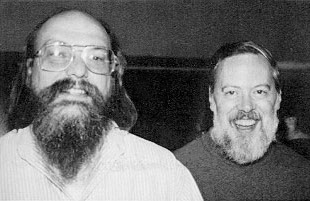
C was created in the early 1970s by Dennis Ritchie at Bell Labs. It was used to write the Unix operating system. Almost every modern language, including Python, is built on top of ideas from C. Many scientific codes that you will encounter in research—such as Gadget for cosmology or AthenaK for astrophysical fluid dynamics—are written in C or C++. Knowing C will let you read and even modify these codes.
The main reason C is powerful in computational physics is performance. C is compiled into machine code, so it runs very fast. It gives you direct control of memory, which is essential in large simulations. With this control comes responsibility: you must allocate and free memory yourself. This may seem inconvenient at first, but it teaches you how computers actually store and move data.
Python and C are not competitors, instead, they complement each other. You can use Python for prototyping, testing, and visualization. Once the core of your code is correct, you can rewrite the most expensive routines in C and call them from Python. This hybrid approach is common in modern computational physics.
Today’s lab will show you how to get started. We will begin with a very simple numerical method in C/C++. Then we will step up to a small gravitational simulation. The goal is not to master every detail of C/C++ in one day, but to understand why it is useful and to gain the confidence to write simple programs.
The best places to learn C are:
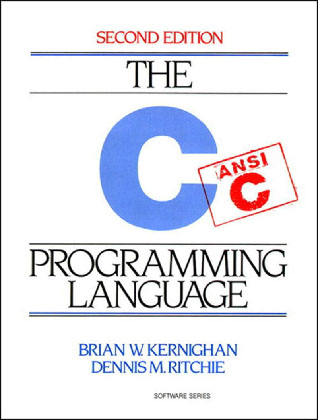
The C Programming Language by Brian W. Kernighan and Dennis M. Ritchie
The c-faq
And high quanlity open source software including the GNU Scientific Library, FFTW, and Linux Kernel.
Many “modern C” books are full of errors, especially memory management. Avoid them.
Essential C Concepts for Python Programmers
If you already know Python, C will feel both familiar and different. The basic ideas are the same: variables, loops, functions. But the details are stricter. C is a compiled, statically typed language. This means you must tell the computer exactly what kind of data each variable holds, and the compiler will translate your code into machine instructions before it runs.
For example, in Python you can write
x = 3
y = 3.5
and the interpreter adjusts the type automatically. In C, you must decide at the start:
int x = 3;
double y = 3.5;
An int stores integers, and a double stores floating-point
numbers.
You cannot freely switch between them.
Pointers are another new concept. A pointer is simply the memory address of a variable. If you declare
double x = 2.0;
double *p = &x;
then p stores the address of x.
You can access the value with *p.
Pointers are powerful because they let you share data across functions
without copying.
Functions also look different. In Python you write
def f(x):
    return x * x
In C you must declare the type of the argument and the return value:
double f(double x)
{
    return x * x;
}
Every statement ends with a semicolon.
Blocks are enclosed in braces { ... }.
Although C does not really support functional programming,
you can mimic function programming by passing “function pointers”.
f from the above code is a point to the function f().
C has no built-in lists like Python. The closest structure is the array. Arrays have fixed size and do not grow automatically. For example:
double a[10]; creates space for 10 floating-point numbers. You access them by
double x = a[0]; where the number in the square bracket is the “offset”.
Pointers and array names seem the same thing. However, they are different. See c-faq for details.
If you need a flexible array at runtime, you must allocate it explicitly with malloc. For instance:
#include <stdlib.h>
...
double *a = (double *)malloc(n * sizeof(double));
This gives you space for n numbers.
When you are done, you must free the memory:
free(a); This brings us to one of the most important differences. Python handles memory automatically, while in C you are responsible for allocating and freeing. If you forget to free memory, your program will leak memory. If you access memory after it is freed, your program may crash. This sounds dangerous, but it also gives you much more control, which is valuable in performance-critical simulations.
Finally, note that every C program begins execution from a function called main. Even if you define many helper functions, the program always starts at
int main(int argc, char *argv[])
{
    ...
    return 0;
}
This is the entry point of your program.
With these basic concepts: types, functions, arrays, memory, pointers, and main, you can already write useful numerical programs.
Example: Forward Euler
We begin with the forward Euler method.
In Python we wrote a simple function that stepped forward in time by
repeatedly updating the value of x.
# https://ua-2025q3-astr501-513.github.io/notes-8/

import numpy as np

def Euler(f, x, t, dt, n):
    X = [np.array(x)]
    T = [np.array(t)]
    for _ in range(n):
        X.append(X[-1] + dt * f(X[-1]))
        T.append(T[-1] + dt)
    return np.array(X), np.array(T)

def f(x):
    return x

n  = 20
dt = 2.0 / n

x0 = 1.0
t0 = 0.0

Xpy, Tpy = Euler(f, x0, t0, dt, n)
print(Xpy)
print(Tpy)from matplotlib import pyplot as plt
plt.plot(Tpy, Xpy, 'o-')
plt.xlabel('t')
plt.ylabel('x')Translating the same idea into C requires a bit more work.
/*
 * Paste the following code into "Euler.c".
 * Compile it with `gcc Euler.c -o Euler` or `make Eule`.
 * Run with `./Euler` or `./Euler > output.txt`.
 */
#include <stdlib.h>
#include <stdio.h>

struct solution {
	double *X;
	double *T;
};

struct solution
Euler(double (*f)(double), double x, double t, double dt, size_t n)
{
	struct solution s = {
		(double *)malloc((n+1) * sizeof(double)),
		(double *)malloc((n+1) * sizeof(double))
	};

	s.X[0] = x;
	s.T[0] = t;

	for (size_t i = 1; i <= n; ++i) {
		s.X[i] = s.X[i-1] + dt * f(s.X[i-1]);
		s.T[i] = s.T[i-1] + dt;
	}

	return s;
}

void
free_solution(struct solution s)
{
	free(s.X);
	free(s.T);
}

double
f(double x)
{
	return x;
}

int
main(int argc, char *argv[])
{
	size_t n  = 20;
	double dt = 2.0 / n;

	double x0 = 1.0;
	double t0 = 0.0;

	struct solution s = Euler(f, x0, t0, dt, n);

	for (size_t i = 0; i <= n; ++i)
		printf("%.9g ", s.X[i]);
	putchar('\n');

	for (size_t i = 0; i <= n; ++i)
		printf("%.9g ", s.T[i]);
	putchar('\n');

	free_solution(s);

	return 0;
}
Note: you may use heredoc:
cat << 'EOF' > Euler.c
...
EOF
to redirect the above code block to a file.
This is not very elegant... But before we dive into the details of the code, let’s try to run it.
Copy and paste the above code block into a file called “Euler.c”.
Run
gcc Euler.c -o Eulerormake Eulerin your terminal. You should see a new file “Euler”.Run the code by
./Euler. It does not create any plot! nstead, just a few numbers. The numbers do match our python output.We may use python to create a plot. But this requires first saving the output to a file. Run
./Euler > data.txt. Here,>is the bash redirection operator as we learned before. It redirects the standard output of a program to a file.
Once “data.txt” is created, run the following python cells:
from numpy import genfromtxt

Xc, Tc = genfromtxt('data.txt')
print(np.max(abs(Xc - Xpy)))
print(np.max(abs(Tc - Tpy)))plt.plot(Tpy, Xpy, 'o-')
plt.plot(Tc, Xc, '.-')
plt.xlabel('t')
plt.ylabel('x')# HANDSON: Use `argc` and `argv` to get parameters at run time.
# HINTS: The `atof()` and `atoi()` C functions convert strings to
# doubles and integers.
Useful Compiler Flags
When you compile with gcc, you can pass extra flags that control how
the compiler behaves.
These flags are important for developing scientific codes, where you
care about correctness, performance, and debugging.
The most common flags are:
gcc Euler.c -o Euler -Wall -O2 -gHere is what each flag means:
-Wallenables most warnings. Warnings catch many common mistakes. For example, using an uninitialized variable or forgetting a return statement. You should always use this flag.-Wextraenables even more warnings.-Werrorturns warnings into errors. This forces you to fix problems before running.-O0,-O1,-O2,-O3,-Ofastcontrol optimization.-O0means no optimization and is easiest for debugging.-O2is a good default for normal use.-O3and-Ofastmay make code faster but harder to debug.-gadds debugging information. Without it, tools likegdbcannot show you which line of code crashed.-lmlinks against the math library (needed for functions likesin,cos,pow).-Lpathtells the compiler where to look for libraries.-lnametells it to link with a library calledlibname.aorlibname.so.
A typical workflow is to compile with -Wall -Wextra -O2 -g during
development.
For production runs, you may add -O3 if you need maximum speed.
# HANDSON: try different combintation of compiling flags.
#          Inspect the size and properties
The Compilation Pipeline
Every C program passes through several stages before it becomes an executable. Understanding these stages helps you debug, optimize, and eventually build larger projects.
First, the preprocessor runs.
It handles all lines that begin with #, such as
#include <stdio.h>.
Header files are inserted, and macros are expanded.
The output is a translation unit, which is still text but with all
includes resolved.
Second, the compiler translates this into assembly. Here your C code becomes instructions for the CPU, but still in human-readable form.
Third, the assembler converts the assembly into machine code stored in
an object file (with .o extension).
This file contains binary instructions but is not yet a runnable
program.
Finally, the linker combines object files and external libraries into a single executable. This is the file you can actually run from the terminal.
The flow looks like this:
Euler.c
  |
  |  Preprocessor (gcc -E)
  v
Euler.i
  |
  |  Compiler (gcc -S)
  v
Euler.s
  |
  |  Assembler (gcc -c)
  v
Euler.o
  |
  |  Linker (gcc -o)
  v
Euler
You can step through these stages explicitly:
gcc Euler.c -E  > Euler.i
gcc Euler.i -S -o Euler.s
gcc Euler.s -c -o Euler.o
gcc Euler.o -o    Euler
# HANDSON: Inspect each of the intermeida files.
# HINTS: Use `objdump` to view object files and `nm` to view
# symbols in binaries.
Although most of the time, just like above, we just type one line:
gcc Euler.c -o Euler -Wall -Wextra -O2 -gMulti-Object Build
Suppose we split the Euler solver into three files. The first file, “Euler.c”, contains only the solver:
#include <stdlib.h>
#include "Euler.h"

struct solution
Euler(double (*f)(double), double x, double t, double dt, size_t n)
{
	struct solution s = {
		(double *)malloc((n+1) * sizeof(double)),
		(double *)malloc((n+1) * sizeof(double))
	};

	s.X[0] = x;
	s.T[0] = t;

	for (size_t i = 1; i <= n; ++i) {
		s.X[i] = s.X[i-1] + dt * f(s.X[i-1]);
		s.T[i] = s.T[i-1] + dt;
	}

	return s;
}

void
free_solution(struct solution s)
{
	free(s.X);
	free(s.T);
}
The header file, “Euler.h”, declares the interface:
#ifndef EULER_H
#define EULER_H

struct solution {
	double *T;
	double *X;
};

struct solution Euler(double (*)(double), double, double, double, size_t);
void free_solution(struct solution);

#endif /* EULER_H */
So the main program, “main.c”, now looks much simpler:
#include <stdio.h>
#include "Euler.h"

double
f(double x)
{
	return x;
}

int
main(int argc, char *argv[])
{
	size_t n  = 20;
	double dt = 2.0 / n;

	double x0 = 1.0;
	double t0 = 0.0;

	struct solution s = Euler(f, x0, t0, dt, n);

	for (size_t i = 0; i <= n; ++i)
		printf("%.9g ", s.X[i]);
	putchar('\n');
	for (size_t i = 0; i <= n; ++i)
		printf("%.9g ", s.T[i]);
	putchar('\n');

	free_solution(s);

	return 0;
}
Even before creating library, we can also make compilation more efficient by compiling the different files separately.
gcc -c Euler.c -o Euler.o -Wall -Wextra
gcc -c main.c  -o main.o  -Wall -Wextra
gcc main.o Euler.o -o Euler -O2 -g
This multi-stage compilation allows us to compile only the changed files. For large project, this can significantly save your compilation time.
# HANDSON: Create a `Makefile` to track the dependence of the above
#          multi-stage compilation.
Linking with Static Libraries
When we linked main.o with euler.o, we directly included one
object file.
For larger projects, it is better to package many object files into a
library.
There are two common types: static libraries and shared libraries.
A static library is an archive of object files. It has the extension .a on Unix systems. When you link against a static library, the linker copies the needed object code into your executable. The final executable contains everything it needs.
Let’s build a static library for our Euler solver.
We already have an object file Euler.o.
We then use the ar tool (archiver) to create a library:
ar rcs libEuler.a Euler.oNow you have a static library called libEuler.a.
To link it with your program:
gcc main.c -L. -lEuler -o EulerThe flag -L. tells the linker to look in the current directory.
The flag -lEuler tells it to link against libEuler.a.
You do not type the lib prefix or .a suffix.
When you run ./Euler, it behaves the same as before.
The difference is that the Euler solver code has been copied into the
executable.
Linking with Dynamic Libraries
A shared library is different.
Instead of copying code into the executable, the linker records that
the code lives in a separate .so file (shared object).
The executable will load the library at runtime.
Shared libraries save disk space, reduce memory usage when multiple
programs share the same code, and make it possible to update the
library without recompiling the whole program.
Let’s build a shared library for Euler.
Compile with the -fPIC flag (position-independent code):
gcc -fPIC -c Euler.c -o Euler.oThen create the shared library:
gcc -shared Euler.o -o libEuler.soNow compile the main program and link against it:
gcc main.c -L. -lEuler -o EulerWhen you run ./Euler, the system will try to load libEuler.so.
If it is in the current directory, you may need to update the library
path:
export LD_LIBRARY_PATH=.
./Euler
Now the executable is much smaller.
The code for Euler lives in libEuler.so, and the program loads it
dynamically when it runs.
The main difference between static and shared libraries is in
flexibility and distribution.
Static libraries make executables larger but self-contained.
Shared libraries keep executables smaller and easier to update, but
require the .so file to be available on the system.
In scientific computing, both are used.
Many system libraries, such as libm.so (math functions), are shared.
Some performance-critical libraries, such as BLAS, are often linked
statically for speed and reproducibility.
From C to C++
C is powerful, but it can feel low-level. You must handle memory yourself and use structs when you want to group data. C++ extends C with features that make programs easier to organize and safer to use. Most large scientific codes today use C++, often mixed with C.

C++ was created in the early 1980s by Bjarne Stroustrup at Bell Labs. Stroustrup wanted the efficiency and low-level control of C, but with features that made it easier to manage large programs. He called his early work “C with Classes”. Over time, this grew into C++, which added object-oriented programming, stronger type checking, and later modern features such as templates and the standard library.
One key addition in C++ is class.
A class is like a struct, but it can also contain functions.
This lets you group data and the functions that act on it together.
In our Euler example, we had a struct with arrays T and X, plus
separate functions to free the memory.
In C++ we can wrap this into a class.
Here is a minimal version of the same Euler solver written in C++:
// Paste the following code into "Euler++.cxx".
// Compile it with `g++ Euler++.cxx -o Euler++`.
// Run with `./Euler++` or `./Euler++ > output.txt`.

#include <vector>
#include <iostream>

using namespace std;

class Euler
{
public:
	vector<double> T;
	vector<double> X;

	Euler(double (*f)(double), double x, double t, double dt, size_t n)
	{
		X.resize(n+1);
		T.resize(n+1);

		X[0] = x;
		T[0] = t;

		for (size_t i = 1; i <= n; ++i) {
			X[i] = X[i-1] + dt * f(X[i-1]);
			T[i] = T[i-1] + dt;
		}
	}
};

double
f(double x)
{
	return x;
}

int
main(int argc, char *argv[])
{
	size_t n  = 20;
	double dt = 2.0 / n;

	double x0 = 1.0;
	double t0 = 0.0;

	Euler s(f, x0, t0, dt, n);

	for (int i = 0; i <= n; ++i)
		cout << s.X[i] << " ";
	cout << endl;

	for (int i = 0; i <= n; ++i)
		cout << s.T[i] << " ";
	cout << endl;

	return 0;
}
There are several important differences.
Instead of raw arrays with malloc and free, we use std::vector.
Vectors manage memory automatically, so we do not need to call free.
We also use std::cout for printing, which is the C++ alternative to
printf().
The constructor of the class Solution builds the arrays and fills them with values. This makes the code shorter and less error-prone. In C++ we can rely on the language to clean up memory when objects go out of scope.
This example shows the main advantage of C++ for scientific computing: you can keep the performance of C but write code that is more structured and easier to maintain.
Copy and paste the above code block into a file called “Euler++.cxx”.
Run
g++ Euler++.cxx -o Euler++in your terminal. You should see a new file “Euler++”.Run
./Euler++ > data++.txt.
Once “data++.txt” is created, run the following python cells:
Xcxx, Tcxx = genfromtxt('data++.txt')print(np.max(abs(Xcxx - Xpy)))
print(np.max(abs(Tcxx - Tpy)))plt.plot(Tpy, Xpy, 'o-')
plt.plot(Tc, Xc, '.-')
plt.plot(Tcxx, Xcxx, '--')
plt.xlabel('t')
plt.ylabel('x')# HANDSON: Use `argc` and `argv` to get parameters at run time.
# HINTS: The `atof()` and `atoi()` C functions convert strings to
# doubles and integers.
-body Simulation in C
We now return to C and build something more interesting: an -body solver. We want to model a system of particles interacting through Newton’s law of gravitation. Each particle feels a force from every other particle, and its position and velocity evolve in time.
We have already written and optimized a Python version of this code. Our goal now is to translate that logic into C. The main difference is that in C we must manage arrays and memory directly, and we must write explicit loops to compute forces. This may feel more verbose than Python, but it will also run much faster (other than the JAX accelerated versions), especially when the number of particles becomes large.
Header File
Seeing our previous multi-object build, let’s follow that pratice to write our -body code in multiple source files. In order for the different files to understand the data structure and function prototype, let’s first create a header file “nbody.h”.
#ifndef NBODY_H
#define NBODY_H

#include <stddef.h> /* for size_t */

typedef double scalar;

typedef struct {
	scalar x, y, z;
} vector;

void acc     (scalar *, vector *,           vector *, size_t);
void leapfrog(scalar *, vector *, vector *, vector *, size_t, scalar);

#endif /* NBODY_H */
We defined a type alias scalar for double.
I.e., typedef double scalar;.
We defined a vector structure to represent a 3D vector with components
x, y, and z of type scalar.
We also declared the following function prototypes:
void acc (scalar *m, vector *r, vector *a, size_t n);void leapfrog(scalar *m, vector *r, vector *v, vector *a, size_t n, scalar dt);
Note that variable names in function prototypes are optional.
Gravitational Acceleration
Next, we more-or-less translate acc8() into C.
Recall from our last lab:
# O3. Use fast operations

def acc7(m, r): # this is a modification of acc4()

    n = len(m)
    a = []
    for i in range(n):
        axi, ayi, azi = 0, 0, 0
        for j in range(n):
            if j != i:
                xi, yi, zi = r[i]
                xj, yj, zj = r[j]

                dx = xi - xj
                dy = yi - yj
                dz = zi - zj

                rrr = (dx*dx + dy*dy + dz*dz)**(3/2)
                f   = - m[j] / rrr

                axi += f * dx
                ayi += f * dy
                azi += f * dz

        a.append((axi, ayi, azi))

    return a
The accelerate function calculates the gravitational acceleration on each body in an -body system. The acceleration on the -th body is computed by summing the contributions from all other bodies (with ) according to
Let’s rewrite this in C and put it in “acc.c”.
#include "nbody.h"
#include <math.h>

void
acc(scalar *m, vector *r, vector *a, size_t n)
{
	for(size_t i = 0; i < n; ++i) {
		a[i].x = 0;
		a[i].y = 0;
		a[i].z = 0;

		for(int j = 0; j < n; ++j) {

			if(j == i)
				continue;

			vector dr = {
				r[i].x - r[j].x,
				r[i].y - r[j].y,
				r[i].z - r[j].z
			};

			scalar rr = dr.x * dr.x + dr.y * dr.y + dr.z * dr.z;
			scalar f  = - m[j] / (rr * sqrt(rr));

			a[i].x += f * dr.x;
			a[i].y += f * dr.y;
			a[i].z += f * dr.z;
		}
	}
}
Leapfrog Integrator
The next function to look into is leapfrog4().
Recall from our last lab:
# O4. Use NumPy

def leapfrog4(m, r0, v0, a0, dt, acc=acc6):

    # TODO: rewrite the following code using numpy

    n  = len(m)

    # vh = v0 + 0.5 * dt * a0
    vh = [[v0xi + 0.5 * dt * a0xi
               for v0xi, a0xi in zip(v0i, a0i)]
               for v0i,  a0i  in zip(v0,  a0 )]

    # r1 = r0 + dt * vh
    r1 = [[x0i + dt * vhxi
               for x0i, vhxi in zip(r0i, vhi)]
               for r0i, vhi  in zip(r0,  vh )]

    # v1 = vh + 0.5 * dt * a1
    a1 = acc(m, r1)
    v1 = [[vhxi + 0.5 * dt * a1xi
               for vhxi, a1xi in zip(vhi, a1i)]
               for vhi,  a1i, in zip(vh,  a1 )]

    return r1, v1, a1
which implements the kick-drift-kick leapfrog algorithm discussed in lecture ODE II.
The C code we can put in “leapfrog.c” is:
#include "nbody.h"

void
leapfrog(scalar *m, vector *r, vector *v, vector *a, size_t n, scalar dt)
{
	scalar ht = 0.5 * dt;

	for(size_t i = 0; i < n; ++i) {
		v[i].x += ht * a[i].x;
		v[i].y += ht * a[i].y;
		v[i].z += ht * a[i].z;
	}

	for(size_t i = 0; i < n; ++i) {
		r[i].x += dt * v[i].x;
		r[i].y += dt * v[i].y;
		r[i].z += dt * v[i].z;
	}

	acc(m, r, a, n);

	for(size_t i = 0; i < n; ++i) {
		v[i].x += ht * a[i].x;
		v[i].y += ht * a[i].y;
		v[i].z += ht * a[i].z;
	}
}
Print and Main Functions
Finally, we have to write print and main functions. To keep things simple, let’s avoid the input part (for now) and put things in “main.c”.
#include "nbody.h"
#include <stdlib.h>
#include <stdio.h>
#include <math.h>

void
printvs(vector *v, size_t n)
{
	for(size_t i = 0; i < n; ++i)
		printf("%f %f %f\t", v[i].x, v[i].y, v[i].z);
	printf("\n");
}

int
main(int argc, char *argv[])
{
	size_t n  = 3;
	size_t nt = 1000;
	scalar dt = 2 * M_PI / 3 / nt;

	scalar m[] = {1, 1, 1};
	vector r[] = {{+0.9700436,   -0.24308753, 0},
	              {-0.9700436,   +0.24308753, 0},
	              {0, 0, 0}};
	vector v[] = {{+0.466203685, +0.43236573, 0},
	              {+0.466203685, +0.43236573, 0},
	              {-0.93240737,  -0.86473146, 0}};
	vector a[n];

	acc(m, r, a, n);

	for(size_t i = 0; i < nt; ++i) {
		leapfrog(m, r, v, a, n, dt);
		printvs(r, n);
	}

	return 0;
}
Building the Code
To build the program, let’s create a “Makefile”
SRC := acc.c leapfrog.c main.c
OBJ := $(SRC:.c=.o)

nbody: $(OBJ)
	gcc -lm $^ -o $@

%.o: %.c nbody.h
	gcc -std=c11 -Wall -Wextra -O2 -g -c $< -o $@
We can then compile the code with make and run the code with
./nbody > data.txt.
Visualization
Let’s now load the output and plot them.
data = genfromtxt('data.txt')X1 = data[:,0]
Y1 = data[:,1]
X2 = data[:,3]
Y2 = data[:,4]
X3 = data[:,6]
Y3 = data[:,7]plt.plot(X1, Y1)
plt.plot(X2, Y2)
plt.plot(X3, Y3)# HANDSON: Adjust the initial conditions.
# HANDSON: Use `argc` and `argv` to configure the nbody program.
# HANDSON: Use `stdin` to read in the initial conditions.
The -body problem is a classic problem in computational physics.
Writing this code in C forces us to think carefully about data layout,
memory management, and performance.
Unlike Python, where arrays and memory are handled automatically, in C
every allocation and loop matters.
Optimizing array access, minimizing function calls inside loops, and
compiling with the right flags (-O2 or -O3) can lead to
significant speed-ups.