In this lab, we will:
Downloads and loads MNIST into NumPy arrays (if it doesn’t already exist locally).
Builds a simple Multi-Layer Perceptron in JAX.
Trains the network on MNIST.
Evaluates the performance on test data.
Provides a custom inference function for your own handwriting images.
This lab is based on a JAX example.
Please notice that MNIST is the “hello world” for machine learning, and there are many many examples available online, including some simplier ones that use libraries: JAX with pre-built optimizers, FLAX, pytorch, and Keras.
# HANDSON: We would like to do some comparison ...
#          Let's separate the class into three groups.
#          Group 1 will use CPU for running this notebook.
#          Groups 2 and 3 will use GPU and TPU, respectively.
MNIST Data Loader
We start by downloading the MNIST data set and store it locally. Our data loader will parse, reshape, normalize them, and return them in NumPy arrays.
from os.path import isfile
from urllib.request import urlretrieve

base_url = "https://storage.googleapis.com/cvdf-datasets/mnist/"

# File names
files = {
    "train_images": "train-images-idx3-ubyte.gz",
    "train_labels": "train-labels-idx1-ubyte.gz",
    "test_images":  "t10k-images-idx3-ubyte.gz",
    "test_labels":  "t10k-labels-idx1-ubyte.gz",
}

for key, file in files.items():
    if not isfile(file):
        url = base_url + file
        print(f"Downloading {url} to {file}...")
        urlretrieve(url, file)
    else:
        print(f"{file} exists; skip download")
train-images-idx3-ubyte.gz exists; skip download
train-labels-idx1-ubyte.gz exists; skip download
t10k-images-idx3-ubyte.gz exists; skip download
t10k-labels-idx1-ubyte.gz exists; skip download
import gzip
import struct
import array
from jax import numpy as np

# Parsing functions

def parse_labels(file):
    with gzip.open(file, "rb") as fh:
        _magic, num_data = struct.unpack(">II", fh.read(8))
        # Read the label data as 1-byte unsigned integers
        return np.array(array.array("B", fh.read()), dtype=np.uint8)

def parse_images(file):
    with gzip.open(file, "rb") as fh:
        _magic, num_data, rows, cols = struct.unpack(">IIII", fh.read(16))
        # Read the image data as 1-byte unsigned integers
        images = np.array(array.array("B", fh.read()), dtype=np.uint8)
        # Reshape to (num_data, 28, 28)
        images = images.reshape(num_data, rows, cols)
        return images
# Parse raw data
train_images_raw = parse_images(files["train_images"])
train_labels_raw = parse_labels(files["train_labels"])
test_images_raw = parse_images(files["test_images"])
test_labels_raw = parse_labels(files["test_labels"])# Standardize the images, i.e., flatten and normalize images to [0, 1]
def standardize(images):
return images.reshape(-1, 28*28).astype(np.float32) / 255
train_images = standardize(train_images_raw)
test_images = standardize(test_images_raw)# One-hot encode labels
def one_hot(labels, num_classes=10):
return np.eye(num_classes)[labels]
train_labels = one_hot(train_labels_raw, 10).astype(np.float32)
test_labels = one_hot(test_labels_raw, 10).astype(np.float32)Visualize Some Training and Testing Data
Let’s take a look at our data set!
from matplotlib import pyplot as pltplt.imshow(train_images_raw[0,:,:], cmap='gray')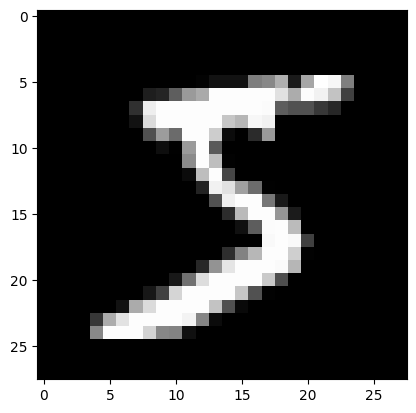
plt.imshow(test_images_raw[0,:,:], cmap='gray')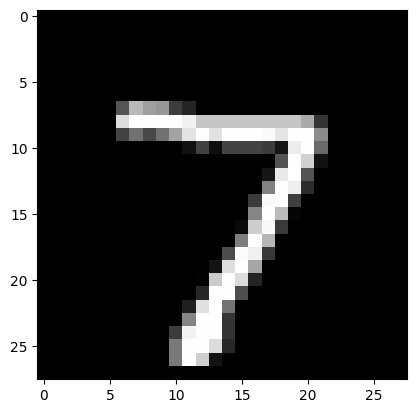
Define a Simple Neural Network in JAX
In this subsection, we introduce the core function needed to
initialize the parameters of a multi-layer network.
Our network will have multiple layers, each characterized by a weight
matrix W and a bias vector b.
We will use random initialization scaled by a small factor to ensure
stable starting values for training.
from numpy.random import RandomState

def init_params(scale, layer_sizes, rng=RandomState(0)):
    """
    Initialize the parameters (weights and biases) for each layer in the network.

    Parameters
    ----------
    scale : float
        A scaling factor to control the initial range of the weights.
    layer_sizes : list of int
        The sizes of each layer in the network.
        e.g., [784, 1024, 1024, 10] means:
            - Input layer: 784 units
            - Hidden layer 1: 1024 units
            - Hidden layer 2: 1024 units
            - Output layer: 10 units
    rng : numpy.random.RandomState
        Random state for reproducibility.

    Returns
    -------
    params : list of tuples (W, b)
        Each tuple contains (W, b) for a layer.
        - W is a (input_dim, output_dim) array of weights
        - b is a (output_dim,) array of biases
    """
    return [
        (scale * rng.randn(m, n), scale * rng.randn(n))
        for m, n in zip(layer_sizes[:-1], layer_sizes[1:])
    ]
In the above function,
We specify a list of layer sizes: for example,
[784, 1024, 1024, 10].For each pair of consecutive sizes
(m, n), we create a weight matrix W of shape(m, n)and a bias vectorbof shape(n,).Multiplying by scale ensures that initial values are not too large, which helps prevent numerical issues early in training.
We store all
(W, b)pairs in a list, one pair per layer, to be used throughout training and inference.
By calling init_params(scale, layer_sizes), you obtain an
easy-to-manipulate structure that keeps all the parameters needed for
your neural network.
# Define network architecture and hyperparameters

layer_sizes = [784, 1024, 1024, 10]  # 2 hidden layers
param_scale = 0.1
# Initialize parameters
params = init_params(param_scale, layer_sizes)# HANDSON: count how many parameters are in your neural network!
# HANDSON: Let's split the class into 2 groups.
#          Group 1 makes their neural networks wider.
#          Group 2 makes theirs deeper.
#          We will compare the training and testing performance later.
Forward Pass: The predict Function
Once the network parameters are initialized, we need a function to
perform the forward pass, producing an output for each batch of
inputs.
Below, we define predict to process data through multiple layers,
using a tanh activation on the hidden layers, and compute a
log-softmax on the final output layer for stability.
from jax import numpy as np
from jax.scipy.special import logsumexp
def predict(params, inputs):
"""
Compute the network's output logits for a batch of inputs, then subtract
log-sum-exp for numerical stability (log-softmax).
Network architecture:
- Hidden layers use tanh activation
- Output layer is linear (we'll do log-softmax here)
Parameters
----------
params : list of (W, b) tuples
Network's parameters for each layer.
inputs : np.ndarray
A batch of input data of shape (batch_size, input_dim).
Returns
-------
np.ndarray
Log probabilities of shape (batch_size, 10).
"""
activations = inputs
# Hidden layers
for w, b in params[:-1]:
outputs = np.dot(activations, w) + b
activations = np.tanh(outputs)
# Final layer (logits)
final_w, final_b = params[-1]
logits = np.dot(activations, final_w) + final_b
# Log-Softmax: subtract logsumexp for numerical stability
return logits - logsumexp(logits, axis=1, keepdims=True)In the above function,
Hidden Layers (
tanh): Each hidden layer applies a linear transformation (np.dot(activations, w) + b) followed by the hyperbolic tangent activation function (np.tanh).Final Layer (
logits): The last layer’s output is not activated by tanh; instead, we use it directly as logits.Log-Softmax: We transform logits to log probabilities by subtracting the logsumexp(logits) along the class dimension. This step ensures numerical stability and can be directly used to compute losses like cross-entropy.
Defining the Loss Function
To guide training, we need a loss function that measures how well our network’s predictions match the true labels. This is like when we need to fit a curve. Below, we define a function that computes the negative log-likelihood (NLL) over a batch of data.
def loss(params, batch):
    """
    Computes the average negative log-likelihood loss for a batch.

    Parameters
    ----------
    params : list of (W, b) tuples
        The network's parameters.
    batch : tuple (inputs, targets)
        - inputs: np.ndarray of shape (batch_size, 784)
        - targets: np.ndarray of shape (batch_size, 10) (one-hot labels)

    Returns
    -------
    float
        Mean negative log-likelihood over the batch.
    """
    inputs, targets = batch
    preds = predict(params, inputs)

    # preds are log-probs, multiply with one-hot targets and sum -> log-likelihood
    return -np.mean(np.sum(preds * targets, axis=1))
Inputs and Targets: A single batch typically consists of a set of input vectors (inputs) and corresponding one-hot encoded labels (targets).
Forward Pass: We call predict(params, inputs), which returns the log probabilities for each class.
NLL Computation: We multiply the log probabilities by the one-hot labels (so we only pick out the log probability of the correct class for each example). Summing these values (log-likelihood) and then negating yields the negative log-likelihood.
Mean Value: We take the average across the batch, yielding a scalar loss.
This loss metric drives parameter updates: minimizing it pushes the network to assign higher probabilities to the correct classes.
Evaluating Model Performance
While the network is trained by minimizing the negative log-likelihood (NLL), we often monitor accuracy to get an intuitive sense of model performance. The function below calculates the fraction of samples in a batch that are correctly classified.
def accuracy(params, batch):
    """
    Computes classification accuracy of the network on a given batch.

    Parameters
    ----------
    params : list of (W, b) tuples
        The network's parameters.
    batch : tuple (inputs, targets)
        - inputs: np.ndarray (batch_size, 784)
        - targets: np.ndarray (batch_size, 10) (one-hot labels)

    Returns
    -------
    float
        Fraction of correctly classified samples.
    """
    inputs, targets = batch
    target_class = np.argmax(targets, axis=1)  # ground truth index
    predicted_class = np.argmax(predict(params, inputs), axis=1)
    return np.mean(predicted_class == target_class)
Predicted Class:
We use predict(params, inputs) to get log probabilities.
Taking the argmax across the class dimension finds the class with the highest log probability.
Compare to Ground Truth:
We similarly get the ground truth label indices from the one-hot targets by using np.argmax(targets, axis=1).
Accuracy Computation:
We compute the fraction of instances where the predicted class matches the ground-truth class.
This value ranges between 0 (no correct predictions) and 1 (perfect classification).
Monitoring accuracy alongside the loss offers a more intuitive measure of how well the model performs on a classification task.
Gradient Descent for Training: JIT-Compiled Update Function
To optimize our network, we can use Stochastic Gradient Descent (SGD),
updating parameters in the direction that reduces the loss.
This is essentially the same algorithm we implemented in our
optimization class!
Except we only implement a single step for now.
Here, we decorate our update step with @jit to compile it for
efficient execution on CPU or GPU.
from jax import jit, grad

@jit
def update(params, batch, step_size):
    """
    Single step of gradient-based parameter update using simple SGD.

    grad(loss)(params, batch) computes the gradient of the loss function
    with respect to the parameters for the given batch.
    """
    grads = grad(loss)(params, batch)
    return [
        (w - step_size * dw, b - step_size * db)
        for (w, b), (dw, db) in zip(params, grads)
]grad(loss)automatically differentiates the loss function with respect to all parameters (params), i.e., parameter gradients.SGD Update:
For each weight
w, we update it byw - step_size * dw.Similarly for each bias
b.
@jitdecorator:Compiles the update step using XLA (Accelerated Linear Algebra).
Improves performance by running the update efficiently on CPU/GPU.
Preparing the Batching Mechanism
batch_size = 128 # the number of samples per parameter update.num_train = train_images.shape[0]
num_batches = num_train // batch_size
def get_batch(rng=RandomState(0)):
"""
Generator function that yields shuffled batches indefinitely.
"""
while True:
# Randomly permute the indices
perm = rng.permutation(num_train)
for i in range(num_batches):
batch_idx = perm[i*batch_size : (i+1)*batch_size]
# Yield a tuple (inputs, labels) for this batch
yield (train_images[batch_idx], train_labels[batch_idx])
train_batch_generator = get_batch()Shuffling: Each epoch, we shuffle the training indices (
perm = rng.permutation(num_train)) to ensure that each mini-batch contains a random subset of the dataset.Batch Extraction: We slice the permuted indices into chunks of size batch_size. Each chunk defines which samples from train_images and train_labels go into the current batch.
By continuously yielding batches in an infinite while True: loop, we
can keep calling next(train_batch_generator) without manually
restarting the data pipeline each epoch.
The Training Loop
Now we can train our neural network by iterating over epochs and batches:
learning_rate = 0.001  # the number of times we iterate over the entire training dataset.
num_epochs    = 5      # the number of samples per parameter update.
from time import time
for epoch in range(num_epochs):
start_time = time()
# Go through the entire training set
for _ in range(num_batches):
batch_data = next(train_batch_generator)
params = update(params, batch_data, step_size=learning_rate)
epoch_time = time() - start_time
# Evaluate training and test accuracy
train_acc = accuracy(params, (train_images, train_labels))
test_acc = accuracy(params, (test_images, test_labels))
print(f"Epoch {epoch} in {epoch_time:0.2f} sec")
print(f"Training accuracy: {train_acc:.4f}")
print(f"Test accuracy: {test_acc:.4f}")Epoch 0 in 5.23 sec
Training accuracy: 0.7378
Test accuracy: 0.7515
Epoch 1 in 4.89 sec
Training accuracy: 0.8143
Test accuracy: 0.8279
Epoch 2 in 4.73 sec
Training accuracy: 0.8446
Test accuracy: 0.8569
Epoch 3 in 4.85 sec
Training accuracy: 0.8624
Test accuracy: 0.8707
Epoch 4 in 5.08 sec
Training accuracy: 0.8752
Test accuracy: 0.8812
Breaking the above code down:
Epoch Loop: We run
for epoch in range(num_epochs):to repeat the training process multiple times over the dataset.Batch Loop: For each epoch, we execute a loop
for _ in range(num_batches):to process all training batches.Parameter Update:
We call next(train_batch_generator) to obtain the next (inputs, labels) batch.
We then update the network parameters by calling:
params = update(params, batch_data, step_size=learning_rate)This performs a single SGD step, moving each parameter slightly toward reducing the loss.
Timing: We measure how long each epoch takes by recording the start time with
time()and subtracting from the end time.Evaluation: After processing all batches for the epoch, we compute:
train_acc: Accuracy on the entire training set.test_acc: Accuracy on the reserved test set.
Logging: We print out the epoch number, epoch duration, and both training and test accuracies. Monitoring test accuracy helps assess how well the model generalizes beyond the training data.
# HANDSON: At this point, we have a fully operational training
#          pipeline for MNIST.
#          You can experiment with different hyperparameters (e.g.,
#          learning rate, batch size, number of epochs, network
#          architecture) to see how they affect model performance.
Loading and Preprocessing a Custom Image
To run inference on your own handwriting, we first need to load the image from disk and convert it into a format suitable for our trained network:
from PIL import Image

def load_image(file):
    """
    Loads a grayscale image from `file`, resizes it to 28x28,
    and converts it to a (784,) float32 array with values in [0, 1].

    Parameters
    ----------
    file : str
        Path to the image file (e.g., a PNG or JPG).

    Returns
    -------
    np.ndarray
        An array of shape (1, 784) containing normalized pixel values
        suitable as input to our trained model.
    """
    # Convert the image to grayscale and resize to 28x28
    img = Image.open(file).convert('L').resize((28, 28))

    # Convert to a NumPy array and normalize pixel intensities to [0, 1]
    arr = np.array(img).astype(np.float32) / 255.0

    # Flatten the 28x28 image into a single 784-dimensional vector
    arr = arr.flatten()

    # Reshape to (1, 784) to match the model's expected input batch shape
    return np.array([arr])
Predicting the Digit Class
With a properly formatted image, we can classify it using our trained model’s parameters:
def predict_digit(params, file_path):
    """
    Predict the digit class for a custom handwritten image.

    Parameters
    ----------
    params : list of (W, b) tuples
        The trained network parameters.
    file_path : str
        Path to the custom image file.

    Returns
    -------
    int
        The predicted digit label (0 through 9).
    """
    # Convert the image to a suitable NumPy array
    arr_np = load_image(file_path)

    # Use our 'predict' function to get log probabilities for each class
    log_probs = predict(params, arr_np)  # shape: (1, 10)

    # Select the digit class with the highest log probability
    return int(np.argmax(log_probs, axis=1)[0])
# Download the sample image from GitHub
! wget https://raw.githubusercontent.com/ua-2025q3-astr501-513/ua-2025q3-astr501-513.github.io/refs/heads/main/501/04/sample.png/opt/local/Library/Frameworks/Python.framework/Versions/3.13/lib/python3.13/pty.py:95: RuntimeWarning: os.fork() was called. os.fork() is incompatible with multithreaded code, and JAX is multithreaded, so this will likely lead to a deadlock.
pid, fd = os.forkpty()
--2025-09-25 08:54:11--  https://raw.githubusercontent.com/ua-2025q3-astr501-513/ua-2025q3-astr501-513.github.io/refs/heads/main/501/04/sample.png
Resolving raw.githubusercontent.com (raw.githubusercontent.com)... 185.199.109.133, 185.199.110.133, 185.199.111.133, ...
Connecting to raw.githubusercontent.com (raw.githubusercontent.com)|185.199.109.133|:443... connected.
HTTP request sent, awaiting response... 200 OK
Length: 2459 (2.4K) [image/png]
Saving to: ‘sample.png.1’

sample.png.1        100%[===================>]   2.40K  --.-KB/s    in 0s

2025-09-25 08:54:12 (13.8 MB/s) - ‘sample.png.1’ saved [2459/2459]
# Predict what the digit is

label = predict_digit(params, "sample.png")
print(f"Predicted digit: {label}")
Predicted digit: 3
# HANDSON: 1. Capture or scan your handwritten digit and save as
#             "sample.png".
#             You may also use your cell phone for this.
#
#          2. Call the function:
#
#                 label = predict_digit(params, "sample.png")
#                 print(f"Predicted digit: {label}")
#
#          3. Inspect the result:
#             See whether the predicted label matches the actual digit
#             you wrote.
#
#             With these two functions, your MNIST-trained model can
#             be used in real-world testing scenarios, allowing you to
#             evaluate its performance on custom, hand-drawn images.